Python / Jupyter library
structile is a thin Python package that renders the same viewer
wherever you're running — an inline Jupyter widget, a browser tab, a
written HTML file, or a terminal summary — depending on which renderer
is active. It has no rendering logic of its own: every renderer either
drives an embedded-mode protocol or reuses the same standalone viewer page
described in the standalone viewer guide.
Install
Add pip install "structile[numpy]" if you also want numpy scalar
support and don't already have numpy. pip install "structile[convert]"
(pulls in mini-racer, a prebuilt V8 engine — no Node.js needed) is only
required for structile.convert()'s interpreter-backed paths (its
JSON/Python-repr/CSV ones are pure Python) and for resolving an
interpreter's parsed value directly from Python; everyday
open()/diff() calls with an interpreter never need it, since those
always run the interpreter client-side in the browser instead.
Basic use
import structile as st

st.open({"a": 1, "nested": {"b": 2, "tags": ["x", "y"]}})   # a literal value
st.open("results.json")                                     # or load a file by path
Call it as the last expression in a notebook cell (or wrap it in
IPython.display.display(...)) to render it. It always returns a
RenderHandle.
obj can be any mix of dict, list, tuple, set/frozenset, None,
bool, int (any size — big integers are kept exact end-to-end, never
rounded), float, str, and numpy scalars (if numpy is installed). A
pathlib.Path, or a plain str that happens to name an existing file, is
read from disk and parsed instead of shown as a literal value.
Any other object — a datetime.date, Decimal, UUID, an Enum
member, your own dataclass — is shown as Python writes it
(datetime.date(2020, 1, 1), Color.RED) in its own color, can be
edited in place as that text, and comes back as a real object after a
save — see Editing and saving back to Python.
Pass default= to show such objects some other way instead, the same
escape hatch json.dumps(..., default=...) uses:
Renderers
open() renders through whichever renderer is active, matplotlib-backend
style (matplotlib.use(...) <-> structile.use(...)):
| Renderer | What it does | Auto-selected when |
|---|---|---|
widget |
Inline, editable Jupyter widget. | A notebook kernel with a rich frontend — Jupyter classic/lab, VS Code notebooks, Colab. |
browser |
Writes one self-contained HTML file and opens it in a browser tab — the standalone viewer, with full editing/undo/search/Save. | Outside a notebook, with a display available. |
file |
Same HTML as browser, but just writes it and returns the path — never opens a tab. |
Headless (no display, SSH session, or webbrowser.open() fails). |
none |
Renders nothing. | CI or PYTEST_CURRENT_TEST is set. |
text |
A compact terminal summary. | Never auto-selected — opt in with renderer="text". |
st.open(my_data, renderer="browser")   # force it, this call only
st.use("file")                         # module default, matplotlib.use()-style
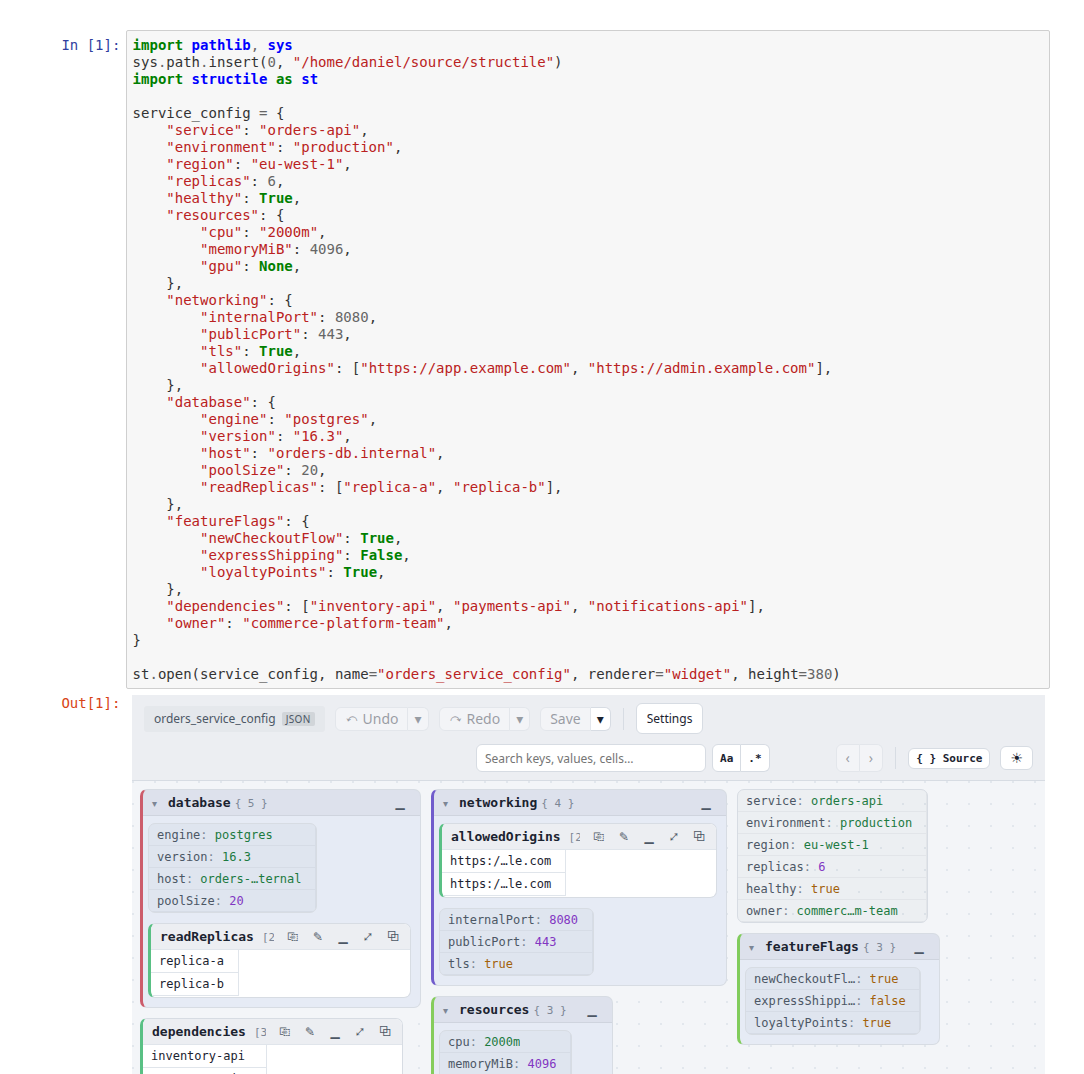 Hover for the other theme
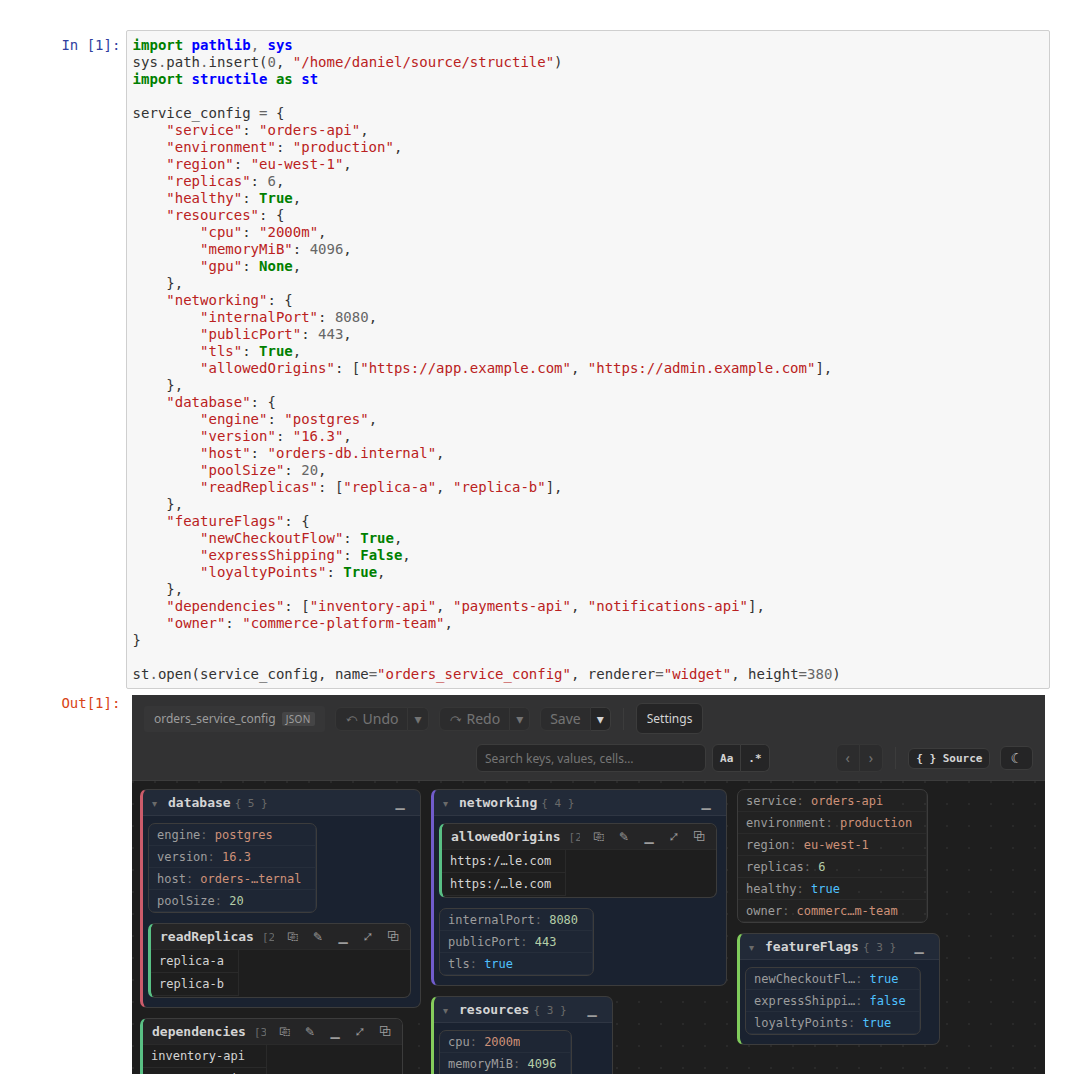
out= writes the standalone HTML somewhere specific; auto_open=False
stops the browser renderer from opening a tab:
st.open(my_data, out="snapshot.html")                    # write only, don't open
st.open(my_data, renderer="browser", auto_open=False)     # write, don't open
Every call returns a RenderHandle:
h = st.open(my_data)
h.path        # where the standalone HTML was last written, or None
h.value       # the displayed value — live (updates on Save) for `widget`
h.open()      # open a browser tab
h.to_html()   # the standalone HTML as a string
h.save(path)  # write that HTML to `path`
Command line
python -m structile data.json
python -m structile data.xml --interpreter path/to/interpreter.js
python -m structile data.json --renderer file --out snapshot.html
python -m structile --about     # version, viewer in use, bundled/registered interpreters
Same renderer resolution as calling open() from a script. --about is
structile.about in a terminal.
Editing and saving back to Python
The widget renderer is read-write: edit inline, then Save (or
Ctrl+S) sends the edited content back to Python instead of downloading it.
h = st.open("results.json")             # loaded from a path: Save writes back to it
h = st.open(my_data, path="out.json")   # in-memory obj: Save writes to out.json
h = st.open(my_data)                    # in-memory, no path: Save only updates h.value
h.value holds the last-saved (parsed) value, updated on every save.
Nothing syncs live per-keystroke — only an explicit Save commits.
Gotcha: editing never mutates the object you passed in — st.open(my_dict)
normalizes it into a separate structure the widget owns. Read h.value
after saving to get the edited result.
Python objects round-trip. A datetime.date/datetime/time,
Decimal, Fraction, UUID, pathlib path, zoneinfo.ZoneInfo,
complex, an Enum member or a dataclass instance in your data is shown
as its repr() text and can be edited in place as that text:
double-click datetime.date(2020, 1, 1), type datetime.date(2021, 2, 3).
After Save, h.value holds real objects again — the original object
wherever you didn't touch it, and a new one built from your text where
you did. Your text is never run with eval(): only those standard-library
types and the classes already present in your data are allowed. If an
edit can't be turned back into an object (datetime.date(2020, 13, 1),
an unknown name), the viewer says so and h.value keeps its previous
value. An object used as a dict key is shown as its str() and comes
back as that string — only values are revived.
Custom formats via an interpreter
Pass interpreter= — a path to a .js file, raw JS source, or a list of
candidates tried in order — to hand the viewer raw text instead of a
Python value, parsed (and, on save, serialized back) client-side:
st.open("config.xml", interpreter="path/to/generic_xml.js")

st.register_interpreter(".xml", "path/to/generic_xml.js")
st.open("config.xml")   # auto-selected from the registry, no interpreter= needed
See Writing and distributing interpreters for the
full contract and how to package one up so a colleague never has to think
about it at all. Unsure which combination of obj/format=/interpreter=
applies to your case? See
Choosing obj, format, interpreter.
Interpreter options: interpreterOptions=
An interpreter can declare its own options — the controls the viewer's
puzzle-piece panel draws for it — and hover hints computed from them;
the bundled generic_xml.js shows amounts multiplied by a factor —
in millions, or converted to another currency
(live demo). The panel appears in the Jupyter widget too. interpreterOptions=
pre-sets those values for one document: a dict keyed by the interpreter's
INTERPRETER_NAME, then by option id, with the special key
"@inline": True switching the panel's Show hints in cells on.
Values are bool, int, float or str:
st.open(
    "portfolio.xml", interpreter="generic_xml.js",
    interpreterOptions={"generic_xml": {           # amounts in millions
        "scaleEnabled": True, "scaleMatch": "notional|balance|nav",
        "scaleFactor": 1e-6, "scaleSymbol": "$", "scaleDecimals": 1,
        "scaleFormatTooltip": r"in millions: \1\2m", "scaleFormatCell": r"≈ \1\2m",
        "@inline": True,                           # write the hints in the cells too
    }},
)
It's an ordinary viewer option (see Configuring the viewer),
so config={"interpreterOptions": {...}} works too, and
st.set_option("interpreterOptions", {...}) makes it the default for
every open() after it. A wrongly shaped value raises TypeError at the
call; a value the interpreter's control can't take is replaced by that
control's default in the viewer. The values apply to that document only
— nothing is written to the browser's remembered options, so what the
person at the screen set for that interpreter stays theirs. diff()
takes the same interpreterOptions= — the one viewer option it has (it
still takes no other config= settings) — applied to both sides, each
side's interpreter reading its own entry. See Hover hints and interpreter
options for the
option ids an interpreter declares and how to write your own.
A viewer saved from the standalone page with Save viewer with
interpreter… (a copy with that interpreter built in) can serve as the
viewer here as well: st.set_viewer_html("acme_viewer.html") points
every renderer at it, and st.build_custom_html(manifest, source_html="acme_viewer.html")
bakes further interpreters into it.
Comparing two files (structile.diff)
left/right each accept anything open()'s obj does. interpreter=/
format=/name= each accept a single value (applied to both sides) or a
(left, right) tuple, so the two sides can even be different,
mutually-incompatible schemas, each resolved through its own interpreter:
st.diff(
    "schema_a.xml", "schema_b.xml",
    interpreter=("generic_xml.js", "tagged_xml.js"),
    format="xml",
)
renderer=/out=/auto_open= work the same as open()'s. view=
("unified"/"split") matches the standalone viewer's own header
buttons. renderer="widget" renders an inline two-sided diff widget in
Jupyter; each side's source pane can be independently edited and saved —
h.left_value/h.right_value read through to the live widget, updated on
that side's own Save.
Flexible diff: rules=
A diff is exact unless told otherwise. rules= hands over the viewer's
≈ Flexible diff panel as a dict, so the diff opens with those rules
already set — see Flexible diff for
what each rule does on screen:
st.diff(old, new, rules={
    "equal_when": "abs <= 1e-9 or rel <= 1e-6",  # numbers; literals like 1% and 1bp too
    "whitespace": "collapse",                     # or "trim", "ignore"
    "ignore_case": True,
    "empty_equal": True,                          # null, missing, "", [] and {} are equal
    "ignore": "updatedAt|createdAt",              # a regular expression over value paths
    "paths": {"trades[*].price": "abs <= 0.01", "id": "exact"},
})
Every key is optional, in snake_case or the panel's own camelCase:
- strings:
whitespace("exact","trim","collapse"or"ignore"),ignore_case,ignore_accents,unicode("none","nfc"or"nfkc"),line_endings(CRLF = LF),dates_within(ISO 8601 dates and times in strings within"1d","2h 30m","90s"); - numbers:
equal_when, an expression overabs(|left − right|) andrel(abs ÷ max(|left|, |right|)) with literals such as0.01,1e-6,1%,1bpandand/or/not;nan_equalandignore_zero_sign(both on by default); - other:
empty_equal,ignore(a regular expression matched against each value's path, such astrades[0].updatedAt— whatever matches isn't compared, nor anything under it;/…/ior(?i)ignores case),ignore_order(lists and table rows as multisets),subset(what only the right side has doesn't count),ignore_key_case; paths: per-path rules —{pattern: settings}or[{"path": pattern, **settings}], where a pattern is a path ("trades[*].price","**.name") or a bare key/column name and the most specific match wins; a settings value is a dict of the keys above plusignore/exact(True), or a string — one rule word ("ignore","exact","ignore_order","subset", …),"within 1d", or a number expression;show_tolerated: draw the accepted differences from the start.
A difference a rule accepts isn't hidden silently: it's counted as
"≈ within tolerance" in the diff header, which can show it, muted. A typo
raises ValueError naming every problem before anything renders;
help(structile.diff) lists every key.
Converting between formats
import structile as st

st.convert("data.json", "python")   # -> Python-repr text
st.convert("data.py", "json")       # -> JSON text
st.convert("data.csv", "json")      # -> JSON text (tabs work too, from the content)
st.convert("rows.json", "tsv")      # -> the same table, tab-separated
st.convert("data.xml", "json", interpreter="generic_xml.js")
The built-in formats — "json", "python", and "csv"/"tsv" — convert
between each other with no extra dependency. Anything else needs the
optional mini-racer package (pip install "structile[convert]") — a
real embedded V8 engine, no Node.js/npm/system install needed. Converting
a TOML, YAML or INI file into its own format through the bundled
interpreter keeps it as written — comments, quoting and number spellings
included — rather than normalizing it, the same as a save in the viewer.
Configuring the viewer
import structile as st

st.set_option("theme", "dark")       # module-level default, applies to every call after this
st.get_option("theme")               # read a module-level default back
st.reset_option("theme")             # unset it again

st.open(my_data, gap=8, theme="dark")   # per-call override
The same mechanism reaches display overrides for special values:
st.open(my_data, forNull="N/A")                       # None -> "N/A" everywhere
st.open(my_data, forEmpty="(blank)")                   # "" -> "(blank)"
What a viewer can do: structile.about
structile.about is the standalone viewer's [?] popover from Python:
the version and release date, the documentation links, which viewer HTML
is in use (the package's own, or one set with set_viewer_html), and the
interpreters that come with it — each one's name, version, documentation
links, what it can do (reads, saves, links, hover hints) and its options
with their defaults — plus the interpreters registered in Python and any
plugins found.
import structile as st

st.about                 # as a notebook cell's last line: rendered as HTML
print(st.about)          # the same as text
info = st.about()        # the data (info.to_dict() for JSON)
st.about.interpreters    # just the interpreter section
python -m structile --about prints the same in a terminal, and the
Jupyter widget has the [?] button itself. An interpreter's options and
capabilities are read by running the script, which needs the optional
mini-racer package (pip install "structile[convert]"); without it only
its literal INTERPRETER_NAME/INTERPRETER_VERSION are shown, and the
output says so.
Logging
structile emits to logging.getLogger("structile") — DEBUG for internal
decisions (which renderer/interpreter was picked and why), INFO for real
actions (a file written, a browser tab opened), WARNING for recoverable
hiccups. It never configures handlers/levels itself.
Current limitations
- Fixed iframe height (
height=, default600) — no auto-resize to content yet. - Plain numpy arrays are shown as their
repr()text, not as a table, and that text can't be edited back into an array — call.tolist()first if you need to see or edit the values (numpy scalars are fine). browser/file/none/textrenders are one-way — there's no channel back to Python, soh.valuefor those stays whatever was originally rendered.